C Programming

Introduction to C Programming

C is ageneral-purpose, procedural programming languagedeveloped by Dennis Ritchie in 1972 at Bell Labs. It is known for its speed, efficiency, and close relationship to low-level hardware operations, making it widely used in system programming, operating systems (like UNIX), embedded systems, and software development.

History of C

  • Developed by: Dennis Ritchie

  • Year: 1972

  • Developed at: Bell Laboratories (USA)

  • Predecessor: B language (based on BCPL)

  • C influenced: C++, Java, C#, Objective-C, and many more


Features of C Programming Language

  • Simple and Easy to Learn

    • C has a small set of keywords and clean syntax, making it easy for beginners to understand and use.

  • Structured Language

    • C allows you to break programs into functions, making code more organized, readable, and easier to debug or modify.

  • Fast and Efficient

    • Programs written in C are close to hardware and execute very quickly, making C suitable for performance-critical applications.

  • Low-Level Access with Pointers

    • C supports pointers, which allow direct memory access—a powerful feature for system-level programming like OS or device drivers.

  • Portable Language

    • C programs can run on different machines with little or no modification, making it ideal for cross-platform development.

  • Rich Library

    • C provides a wide variety of built-in functions for tasks like input/output, memory management, and mathematical operations.

  • Modularity

    • C supports modular programming through functions, enabling better code reuse and maintenance.

  • Dynamic Memory Management

    • Through functions like malloc() and free(), C allows runtime memory allocation, which is essential for managing data efficiently.

  • Extensibility

    • New features or functions can be easily added to existing C programs without affecting the existing codebase.

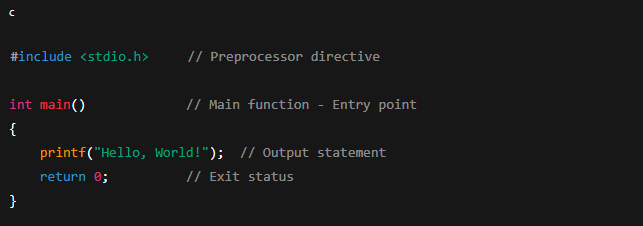
Structure of a C Program

Explanation:

  • #include <stdio.h>: Tells the compiler to include Standard Input Output library.

  • int main(): Every C program starts execution from main().

  • printf(): Used to print output.

  • return 0;: Exits the program successfully.


keywords

Reserved words that have specialmeaning to the compiler

Data Type Keywords

Lorem ipsum dolor sit amet, consectetur adipiscing elit. Ut elit tellus, luctus nec ullamcorper mattis, pulvinar dapibus leo.

  1. int – Integer type

  2. float – Floating-point type

  3. char – Character type

  4. double – Double-precision float

  5. void – No value/return type

Control Flow Keywords

  1. if – Conditional statement

  2. else – Alternative condition

  3. switch – Multi-way branching

  4. case – Used with switch

  5. default – Default case in switch

  6. for – Looping statement

  7. while – Entry-controlled loop

  8. do – Exit-controlled loop

  9. break – Exit from loop or switch

  10. continue – Skip to next loop iteration

  11. goto – Jump to a label

  12. return – Return from a function

Storage Class Specifiers

  1. auto – Default storage class

  2. register – Store in CPU register

  3. static – Preserve value between calls

  4. extern – External global variable

Type Modifiers

  1. signed – Signed data type

  2. unsigned – Unsigned data type

  3. short – Short integer

  4. long – Long integer

  5. const – Read-only variable

  6. volatile – Variable may change unexpectedly

Comments

A comment is a code that is not executed by the compiler, and the programmer uses it to annotate their code, providing explanations or reminders about the code’s functionality, which aids in readability and future maintenance.

Single line comment

Multi-line comment

Data types

Data types in C define the type of data a variable can store. They tell the compiler how much memory to allocate and what kind of operations can be performed on that data.

1. Primary (Built-in) Data Types

Data TypeDescriptionExample
intStores integers10, -5
floatStores decimal numbers3.14, -2.5
doubleStores large decimals2.56789
charStores a single character‘A’, ‘z’
voidNo value (used in functions)

Derived Data Types

These are based on primary types:

  • Array – Collection of similar data (e.g., int arr[10];)

  • Pointer – Stores address of another variable (e.g., int *ptr;)

  • Function – Returns a value (e.g., int add(int, int);)

User-Defined Data Types

Created by programmers:

  • struct – Group of variables (e.g., struct Student { int id; };)

  • union – Shares memory among members

  • enum – Defines named integer constants

  • typedef – Creates a new name for an existing type

Type Modifiers

Used to modify base types:

  • signedunsignedshortlong

  • Example:

Escape Sequences

Escape sequences in C are combinations of characters that begin with a backslash (\) and are used to represent characters that cannot be typed directly. These sequences are interpreted in a special way when used inside string literals or character constants.

For example, the escape sequence \n represents a newline character, and \t represents a tab character. Here are some escape sequence characters used in C language.

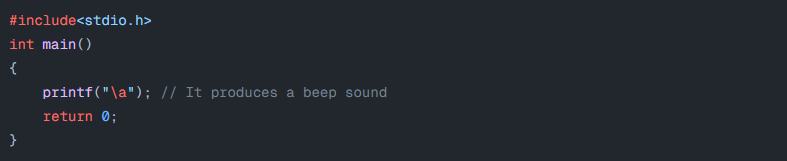
Alarm or Beep

\a produces a beep sound

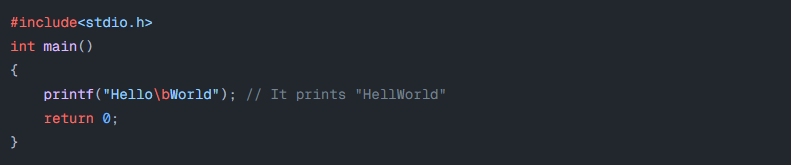
Backspace

\b adds a backspace

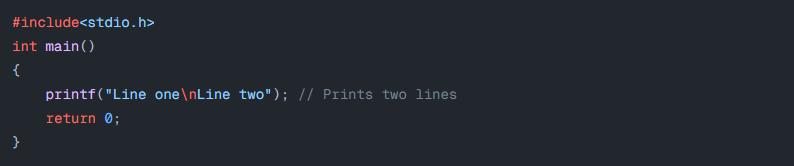
Newline

Newline Character

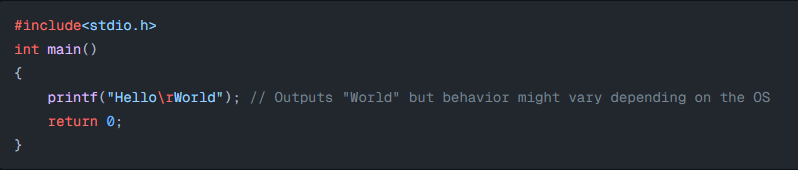
Carriage return

The carriage return, represented by the escape sequence \r in the C programming language, is a control character that resets the cursor position to the beginning of the current line. It doesn’t erase any characters but simply moves the cursor to the start of the line. The string “Hello” is printed first, then the carriage return moves the cursor back to the beginning of the line, and “World” is printed, overwriting “Hello.”

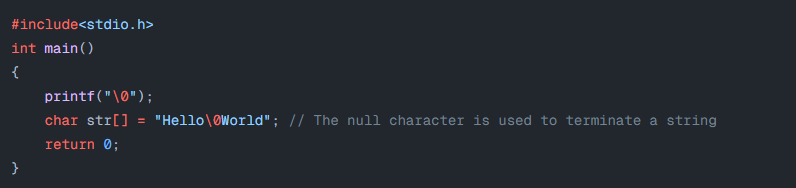
Null

The null character is usually used to terminate a string

Conditional Instructions

Conditional statements are used to perform operations based on some condition.

If Statement

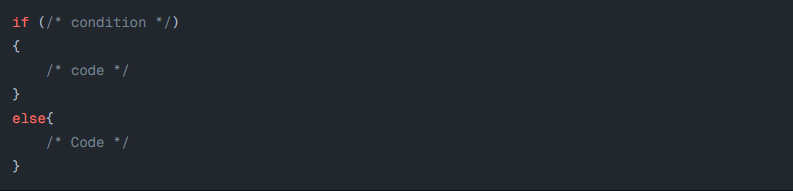
If-else Statement

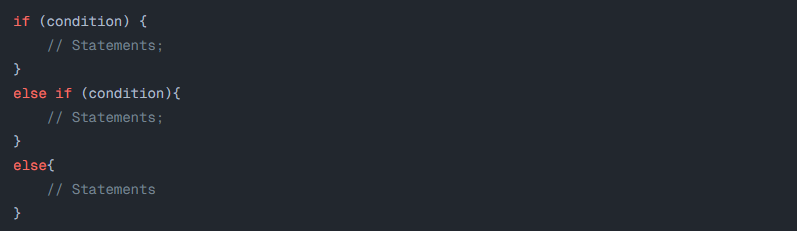
If else-if Statement

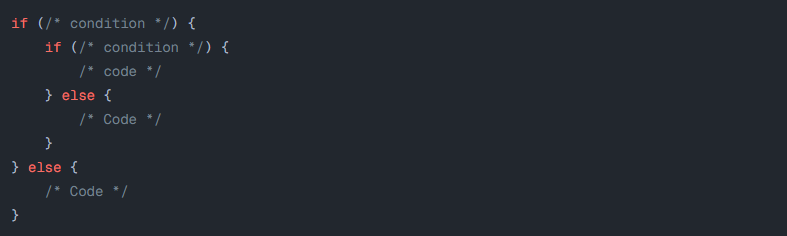
nested if-else

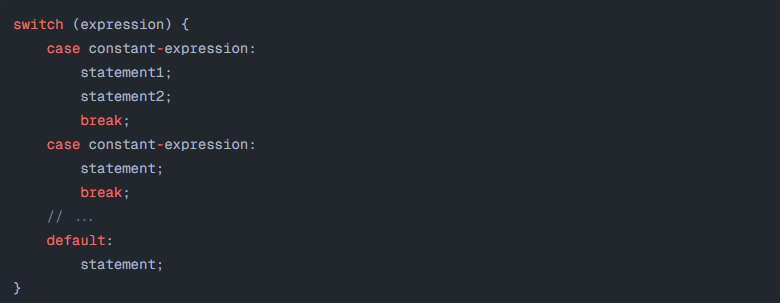
Switch Case Statement

It allows a variable to be tested for equality against a list of values (cases).

Iterative Statements

Iterative statements facilitate programmers to execute any block of code lines repeatedly and can be controlled as per conditions added by the programmer.

while Loop

It allows the execution of statements inside the block of the loop until the condition of the loop succeeds.

Do-while loop

It is an exit-controlled loop. It is very similar to the while loop with one difference, i.e., the body of the do-while loop is executed at least once even if the expression is false

For loop

It is used to iterate the statements or a part of the program several times. It is frequently used to traverse the data structures like the array and linked list.

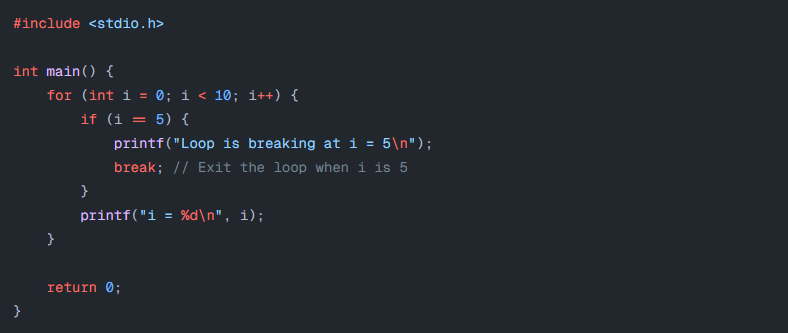
Break Statement

break keyword inside the loop is used to terminate the loop

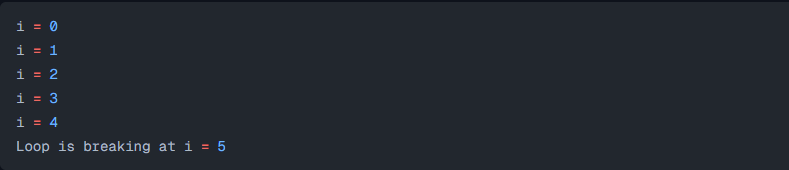
Here is the output of the above code:

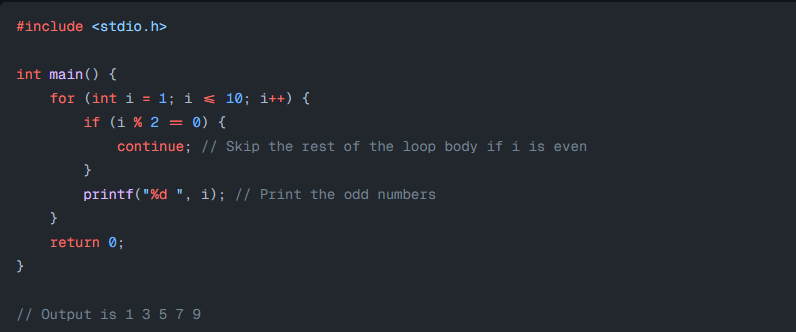
Continue Statement

continue keyword skips the rest of the current iteration of the loop and returns to the starting point of the loop